The Balsamiq Blog is my third blog.
I started in 2003 with Peldi’s Little Blog in which I shared sample applications and things that I learned at work about Flash Communication Server, and ran it for about 3 years.
In 2004 I started PatataMonkey, a pregnancy/daddy blog, which also ran for about 3 years.
In september 2007, long before telling anyone about my startup idea, I started this blog.
Each blog is different, but the motivation to start each of them was the same: I was entering a new phase of my life, jumping into the unknown, “having a new baby” if you will.
It was a stressful time, a time when I felt the need to process my thoughts by writing them down. I needed a diary.
Looking for advice on each new phase of my life, I googled and googled for a blog just like the one I wanted to read, one of someone who had gone through my same path before me or who was going through it at the same time as I was.
Each time I was looking for an established community, a support group: one about FCS development, one about “parenting in San Francisco in 2005″ or one about a “programmer-turned-entrepreneur launching a bootstrapped micro-ISV in 2007″.
After many years of using the World Wide Internet Webs I know now that no matter how small, the community you’re looking for is already out there, hanging out in some corner of the Internet somewhere. You just have to find it.
Problem is, the Internet is a vast place, small communities are really hard to find. Each time I tried, my googling fell short.
So I decided to try and “get found” instead. Each time I decided to pinch my nose, jump in and publish my rants, in the hope that someone would google for my same kind of content one day and find me.
For PatataMonkey, I was desperate to find a new group of friends quickly: none of our “offline friends” at the time were even married, let alone expecting a child at that time. So as soon as I started the blog, I immediately put Google Adsense ads on it. The hope was that Google’s all-powerful algorithms would be able to index and understand my content, returning me advertisements that would lead me to the people I was looking for. Oh mighty Google Spiders, what stores should I be going to? Which sites should I be reading? Is there a blog or forum I should look at?
Well, my nerdy scheme didn’t really work out, but the blogging was a very effective therapy for me, so I kept at it.
Then, with time, as if by magic, a community started to emerge, organically, on its own. Someone would post a comment pointing me to a blog I should read, someone else would suggest a book.
All of a sudden blogging wasn’t a lonely endeavor any more, I wasn’t just speaking to the wind like a crazy person…I had…friends! People just like me, going through the same issues as I was!
Slowly but surely, a little community gathered around my blog, and I started hanging out at other blogs as well, starting to recognize the names of frequent commenters like me.
I realized then that the Internet is a galaxy of warm little communities held together by blogs, mailing lists and now Facebook and LinkedIn groups, Ning networks, Twitter cliques and StackExchange-powered sites.
I guess people call it social media…I call it life in 2010 and beyond.
I read maybe a dozen different blog posts every day, and most of them teach me something new. My favorite posts to read are those written from the heart, those where you can clearly see that the authors needed to get something off their chest.
That’s how I want to write as well: it’s therapy that helps me and helps others in the process. Talk about a win-win!
At this point I cannot imagine my life without blogging.
Blogs are essential for business. Largely because of this blog we got written up in the New York Times and Inc. Magazine (twice!), I get to travel the world speaking at conferences and our software went from zero to leader in just 18 months.
As Paul Hawken says in his awesome “Growing a Business” – one of my all-time favorite business books – in order to be successful you need to get permission of the market first.
I define “the market” as the community of people who are passionate about the problem your company or product is trying to solve. It includes customers, competitors, complementary products, free-loaders. Asking for permission means earning their respect…ideally you need to become a thought-leader in your community.
As you start your blog, ask yourself: which community do I want to try and become a leader of?
Choosing your target should be easy because it should be “people just like me”, or rather “people just like the one I hope to become”. If you succeed in your quest, great things will happen. If you don’t, the high goal you set for yourself will have pushed you to do your best work, teaching you a ton and making you a better person in the process.
It doesn’t have to be related to your product, you’re not doing this to generate more sales. You’re doing this for yourself: to vent, to grow as a person and to be a good citizen.
Sure, if you do a good job your company will benefit from the higher exposure and stuff…but that’s a side-effect, not the end-goal!
Becoming a leader in an online community is done by providing value to its members, continuously, over time. It means listening carefully and genuinely caring for the success of your fellow community members, without ever talking down to them – you’re no better than them, you’re just trying to help. It’s hard work, but very fulfilling work. Share what’s relevant, but don’t spam. Try to keep it short, everyone’s busy. Retweet! Make a Twitter list! Make two! Help others find your community, help it grow! Support it by sponsoring the best blogs and events!
Just the simple act of being yourself, but “in public”, can make a big difference in someone else’s life. You’ll be surprised.
One of my goals for the year is to encourage everyone at Balsamiq to blog, to try to become a leader of their chosen niche.
My dream is for each Balsamiq employee to be better known within their community for their blog rather than the company they work for.
I want Balsamiq to benefit from the “halo effect” of these blogs, not the other way around.
All of us are first-time members of a tech startup. We are all going through a new phase of our lives, learning a ton every day. What better time than this to share what we learn and find our communities in the process?
Starting today, everyone at Balsamiq blogs:
This will be challenging at first, this is a new experience for both Val and Marco. I am thrilled at how enthusiastically they both accepted the challenge, and wish them luck. You can read Val’s first post here and Marco’s first post here (in Italian).
This will also be a significant time-commitment for our little team. Blogging takes time. For instance, it’s incredibly 2:15am already as I write this.
I believe the benefits of us all blogging are more than worth it: if you’re hesitant, just consider each blog post to be like a product release, only one that doesn’t involve coding. It’s that important.
Onward!
Peldi for the Balsamiq team
I bet there are great resources out there by now to help people find communities online. I’ve sent people to this old Marshall Kirkpatrick post before, but I’d love to collect a few more links like it. Which do you recommend?
Another question: I am tempted to splinter off my posts into a new blog (/blogs/peldi perhaps), so that this blog could focus only on product-related news. What do you think? I like the idea of giving people more focused RSS feeds, but I fear that it would effectively mean “starting over” a bit. I don’t know. What are your thoughts?
Thanks for reading this far!
It is my great pleasure to introduce to you the newest member of the Balsamiq team, monsieur Luis Arias, Web Programmer Extraordinaire.

If you’ve been following us for a while you’ll know that Luis and I have been working together since pretty early in the Balsamiq adventure: he coded the Mockups for XWiki plugin back in 2008 as an external contractor.
I enjoyed working with Luis so much that when it came time to start building the Mockups web application back in January 2009, he was my go-to guy.
Luis has been working on myBalsamiq for most of 2009, but only as a part-time project, often being stuck waiting for my input on things. Not budgeting enough time for the web app was one of my main mistakes for 2009, so I see convincing Luis to join as a full-time employee as one big step to correct it.
Luis brings a number of things to the table which our team was missing until now. Four examples:
Luis’s job, at least at first, is to take the lead in “all things myBalsamiq”. Not only he’s the main developer of the back-end of the application, he’s also going to coordinate our work and set our priorities for it, as well publishing new releases, responding to support email, and of course making sure the servers are running smoothly.
He has already made a number of contributions to our internal processes, and I’m looking forward to learning more from him in the years to come.
Luis will also run the new “Balsamiq Tech Blog“, a place for us to share any open-source library we create (we have a few planned already), tips and tricks for programmers and things we learn the hard way as we develop Mockups on all of these platforms. Head over there to see his introductory post and if you’re a programmer, subscibe to our new blog’s RSS feed!
I am very excited about this new blog starting up, you’ll see more of that coming from Marco and Valerie in the near future.
Luis is a genuinely nice person, a family man who loves salsa dancing, plays saxophone and cuban percussions, is a member of the global IT Team for Democrats Abroad France and holds a position there of Member at Large in the Diversity Caucus.
He’ll be working out of his home near Paris, France.
Please join me in extending Luis a warm welcome to the Balsamiq family, we are thrilled to have him and are very excited about what we’ll be able to achieve together in the future.
Luis’ new Twitter account is @balsamiqLuis, which needs followers!
You can also follow his personal account if you wish. I have also added @balsamiqLuis to the balsamiq/team Twitter list.
I will be updating our company page to reflect our new 6-team-members status (six!!!!) in the next few days. We’re not “a couple of people in a studio” any more, yes!
Onward!
This is part two of a two-part post about what happened in 2009 and our plans for 2010. We did this last year as well, it’s becoming somewhat of a tradition!
By the way, thanks so much for all the support and nice words you sent us after yesterday’s post. All this attention is a little overwhelming but it’s a great motivator to continue to give it all we’ve got, so thank you!
I am beyond excited about 2010, I think it will definitely be a key year for us.
First of all, let’s talk about the features we KNOW we MUST deliver in 2010.
The ability to re-use pieces of mockups across your wireframes is our current #1 shortcoming, and our top requested feature on GetSatisfaction.
I have put it off in 2009 (here’s our FAQ about it) because I considered it an advanced feature and needed to get some basic features done first, but the more I use Mockups, the more I feel the need to support it.
Some people call it templates, others call it “master pages”. We are calling them “external controls” for now, which is a much more flexible way to do it.
Basically the idea is that you’ll be able to take a group and convert it into an external control, saved on its own file (in your “project assets” or “account assets” folder). When you make a change to that file, each mockup that uses it will (optionally) get the updates.
You’ll be able to drag and drop these kind of controls straight from the UI library, resize them and set some of their properties, just like any of the built-in controls.
You’ll be able to create libraries of these controls to share with your team and others.
The wireframes on MockupsToGo will also be converted into this kind of reusable, external control.
Very exciting stuff. We’ll start work on it in early February.
We’re putting the finishing touches on version 1.0 of the web app, which is called myBalsamiq. It will have projects, commenting, super-easy sharing, real-time-collaboration, RSS feeds, the goods!
Here’s a couple of screenshots to whet your appetite:


The beta is still closed at the moment, so please don’t ask us for access quite yet. We’ll post here when we have anything to share.
Flash Player 10 is now on more than 90% of computers worldwide, so we can finally switch to requiring it.
Aside from being a lot faster than player 9, it will enable us to add the following cool features:
* properly embedding a font! Bye bye Comic Sans!
* upping the maximum mockup size from 2800×2800 to 4095×4095 pixels
* vertical text! (for labels and tabs)
* Right-To-Left language support
* better printing
* spell check!
We’re going to spend the next couple of weeks thoroughly testing Mockups on Flash Player 10 and Air 1.5, to make sure there are no surprises. Once the switch is made, we’ll start going through the list above. Yay!
Also, Air 2.0 is coming, and it’s FAST! Mockups will feel A LOT snappier…you can try out the beta of it already if you like.
Mariah’s hand-drawings have served us really well this far, and I still love them. They do have a strong character though, they’re instantly recognizable and are a bit too playful for some people.
We’ve heard from many of you that you’d like to have a cleaner, more professional skin to show your wireframes to your more “old-school” clients.
In 2010 we’ll add such a skin…it will still be “sketch-like”, but much much cleaner. We’re very excited about it and hope you’ll like it too!
The plan is to let you choose your favorite skin from a menu item.
I have the feeling that this seemingly little feature will really take Mockups to a new level.
Other important features are the abilty to rearrange tabs via drag+drop (this is pretty much ready, try it now in the pre-release version!), the “Toggle Markup” feature, the ability to only export the selected controls to PNG, the in-product “check for updates” feature, and others.
Longer term, we want to publish a set of APIs so that others can integrate myBalsamiq with their own back-end system. Aside from the technical challenge, there are some licensing issues to think about…this will be challenging but also very cool, I can’t wait. I suspect we’ll start to really think about this in the 2nd half of the year (gotta give the web app some time to mature first!)
We might also add another wiki integration ourselves this year…Jive Clearspace and Mindtouch are the front-runners in my mind, the ones that seem to have a community of commercial plugin vendors starting to form around them. We shall see. Let us know what you think!
Other than that, we have tons and tons of little- and medium-sized improvements to do, our TODO list in Pivotal is ENORMOUS! Fun stuff, we’ll be busy this year!
I hesitate to even write this, but towards the end of the year we might start thinking about our next product…we have lots of ideas and one clear front-runner…but I don’t really want to think about it quite yet, Mockups needs our full attention right now!
The best part of doing so well in 2009 is that we can now afford to expand our team a bit, filling out the roster, so to speak.
We have TWO AWESOME hires lined up, we’ll announce each very soon. I’m SO thrilled at the thought of working with them every day and all that we’ll be able to accomplish together! I don’t want to say more yet even if I’m dying to!
As we grow in staff, we’ll also grow as a company. We just set up our 401k contribution plan and are looking into providing health insurance for our US employees. We’ll also start having some internal company policies (sounds more formal than it will be), which we’ll definitely share with you on this blog to get your feedback on.
I would also love for everyone at Balsamiq to blog more…we are learning so much, it would be a shame not to share it all with you.
Financially, my goal is to reach $2M in revenue, with a stretch goal of $2.5M. That seems like an enormous number right now, we’ll see.
I feel that Mockups (the product) and Balsamiq (the company) are both going through their teens right now. No longer little kids, but not yet mature adults.
In other words, these are turbulent, transformative months, when we decide what kind of adults we want to become.
I hope to be up to the task of steering this ship in the right direction…luckily I am surrounded by great advisers, staff and blogs to help along the way. If you see us make a bad move, tell us! OK? Thanks.
My job will have to change once again, delegating more and spending more time communicating internally (making sure everyone knows what everyone else is doing) and externally (talking to partners etc)…more of a managerial role than I’ve been doing so far. I will continue to make an effort to keep my hands in the code, as that’s really my passion and what I’m best at.
As a company we’ll have to start acting a bit more grown-up, meaning a better website (more updated, easier to navigate, cleaner-looking), as well as standardizing how we deal with partners, resellers and also optimizing our internal processes more.
As the product matures a bit, I suspect we’ll have time to look at metrics a bit more…I’ve been heads down in features right now, totally ignoring anything other than what I KNEW had to be done. Do it first, optimize it later, know what I mean?
The community that formed around Mockups fills us with pride and joy, so we want to help it grow and help its members be successful even more.
For instance, that means giving them ways to make money off of us, by selling external control packs, or simply by us starting an affiliate program.
We’ll also continue to share everything we learn through this blog and by speaking at conferences. As I mentioned in the previous post, we’ll also want to support some more blogs, events, groups and podcasts this year, via sponsorships or discounts.
Last but not least, we will continue to support the efforts of non-profits and do-gooders around the world. Our goal is to give away as much as we take in, we’ll see how we do on that front.
I think the recipe for 2010 is the same we’ve had from the start: work hard, stay true to our values, be proud of what we do every day, provide as much value as we can, and have fun!
Onward!
Peldi
Wow. Just wow.
It’s hard for me to believe how much has happened in Balsamiq-land in 2009.
I feel like a completely different person than when I wrote the “A Look back at 2008” post, just 12 months ago. In a way, I am a different person, and Balsamiq is a completely different company as well.
In this two-part post I’ll first look at what happened in 2009, then share some of our plans for 2010, which we are beyond excited about.
Product Enhancements
Mockups has definitely come a long way in 2009, but we like to believe that it’s still the simple and focused tool we set out to build from the beginning.
Number of official releases: 48
As planned, we released almost every week, sometimes even twice in the same week…we also had a few “secret” releases to fix bugs before anyone noticed.
We are happy we kept the weekly schedule, as it allowed us to fix bugs quickly and showed our customers our commitment to the application.
The drawback of releasing this often is that it makes it harder for us to work on bigger, tougher features. Since we have a few of those planned for the near future – see next post – we might slow down the pace for a little while…maybe to releasing every other week, we’ll see what feels right.
I also have recently realized that updating every single week might be more than most people have an appetite for. We don’t want you to feel like keeping up with our releases is a job, know what I mean? What do you think?
Here are some of the major features we released this year:
Links! The no.1 new feature of the year was the ability to link mockups together. It’s a good feature – no, it’s an essential feature – but it’s one that I didn’t really want to do for a long time for fear it would change Mockups entirely, and one that took me a while to fully digest. That’s why the initial release of it was a bit rocky, it took a few iteration to get it to a point where it was really usable. And guess what, we’re still tweaking it, and we’re not done either (we need to improve how we position mockups while in full-screen, for instance). In retrospect, we needed to include our awesome community earlier in the process for this important feature…I wanted to make it come out with a bang, which was a big mistake. That’s when I learned that long-term value trumps any short-term marketing scheme.
Zoom! Probably the other biggest feature we released this year was zoom and pan. This was a direct result of having someone other than me in the code-base: the coordinate translation calculations required for zooming is one of those things that scare me (not sure why, it’s irrational), so I was planning on postponing this feature for a while. Luckily Marco had no such fear: he jumped in and had it done in no time. Unfortunately, my excitement about getting this awesome new feature in the hands of our customers made me jump the gun and release it in a bad state, but we fixed it all up in a couple of hours in the end (see below).
Mockups for FogBugz! The other major release of the year was Mockups for FogBugz, Marco’s first back-end integration project. We are really pleased with how it turned out and it’s selling very well, both the on-premise and the hosted version.
In Mockups for JIRA, we got rid of the annoying watermarks and replaced them with a 30-day trial. We added the Personal (3-editors) license level first, then switched to full user-based pricing, which is more fair and flexible.
In Mockups for Confluence, we added the 3-editor and 10-editor license levels and added support for linking mockups together, which is super-cool.
Other big features, specific to Mockups for Desktop, include the ability to export all of your mockups as a multi-page, interactive PDF, more native menus, the semi-secret but awesome “DropBox integration“, the Open Recent menu, the switch from Comic Sans to Chalkboard on OSX, a new application icon and a cleaner application skin in general. We also added support for pasting images into a mockup and a way to reuse common images via the project and asset folders.
Some other editor enhancements worth noting are:
We made hundreds of other changes and bug fixes, if you have a few hours to spare you can read our Release Announcements blog posts for the year for all the details.
There’s still a lot to do before we can even say that Mockups is “implemented to vision“, a milestone we think we’ll hit late this year. I’ll blog more about our “Grand Vision” for Mockups soon, I promise.
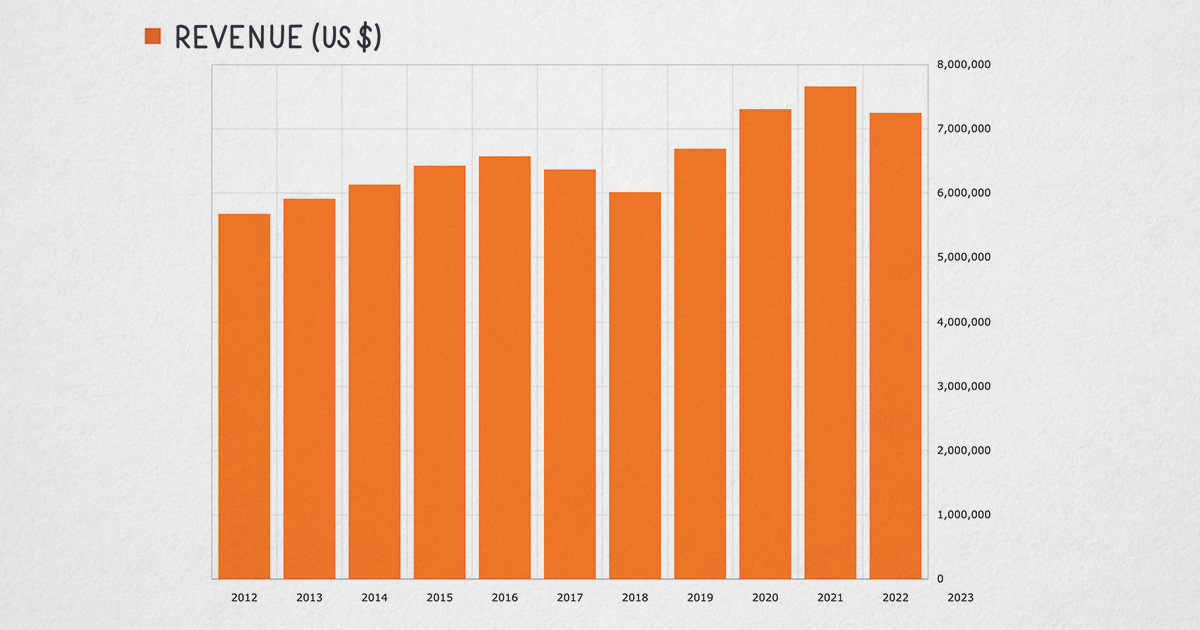
As stated on this blog post from 12 months ago, my goal for the year was to hit $400k in revenue, with a stretch goal of $500k. Well, once again I was reminded about how bad I am at forecasting financial results.
2009 Gross Revenue: $1,626,528.93
That’s over 4 times my 400k goal and over 3 times my stretch goal.
To say that we are blown away by this success is a huge understatement, I never thought a little app like Mockups could bring in these kinds of numbers…and in a recession!
It’s simply awesome…we are literally in awe, every day.
2009 Profits: $1,139,919.59
We were able to maintain a 70% profit margin even as we went from 1 full-time employee to 3, which I’m really happy about – gotta stay scrappy!
This also means that we are very well positioned for the years to come, with money to invest in the company and a solid little cushion in the bank to keep us going even if – God forbid – we hit a rough patch in the future. I love it.
Here are a few charts for your enjoyment. These all show data since we launched, 18 months ago:


Those are some sweet charts, I can’t believe they’re OUR charts! What a ride!
The feeling is the one of being strapped to a rocket, trying to hang on and somehow attempting to steer it a bit by shifting my body weight to one side or the other.
Sales seem to have stabilized a bit in the last 4 months, which is a nice break while we prepare to scale up more – though it could also be due to Thanksgiving and Christmas holidays, we’ll see what surprises January brings…
The biggest change of the year, of course, was Marco joining in March and Valerie in May.
Looking back, it’s funny for me to read the end of year post for 2008, with all those “I”s in there. First of all, I should have already been using “we” since Mariah has been helping out with design and support since 2008, but I guess 12 months ago Balsamiq still felt like “my little baby“. That feeling is now totally gone, replaced by “wow I created this MONSTER-baby that now requires 3 people to tend to it full-time, with some part-time help as well! Argh!”
It seems so obvious now, but I have no doubt in my mind that Valerie and Marco were essential to our success in 2009. When I started Balsamiq I thought I would go at it alone for years…I was really scared at the thought of hiring anyone, and I didn’t expect this kind of success, by far.
Both in Marco and Valerie’s case, I waited until it became clear as day that if I didn’t hire someone quickly, I was going to hurt the company. In both cases I just woke up one day and KNEW that the time was right.
I also knew right away that Marco and Valerie were exactly the right people, and consider convincing them to join Balsamiq my biggest personal achievement of 2009.
I feel really blessed to work with such awesome individuals, sharing this adventure, learning together and from each other, every day. That’s really what it’s all about. I am so thankful.
Speaking of awesome people…the community that formed around Mockups feels like a huge group-hug, every day. We are so lucky to be surrounded by such smart, kind and supportive people. Michael, Adam, Mark, Jenny, Leon, Enrico, Vitorio, Theresa, and countless others. We are so lucky to know you!
To support the community we started off the year by launching MockupsToGo, which has been a big success (84 posts, 222 subscribers, 290,000 page views). It’s so awesome to see the widgets you come up with! In 2010 we plan on making the MockupsToGo stencils more easily embeddable in the app, stay tuned for more.
Together we designed some of the most important features of Mockups, like linking, zoom, the UI library position and others. In 2009 I have learned that we simply MUST involve you in the feature design right from the beginning, or it won’t come out right. Thank you so much for helping us with your use-cases and insight!
Later in the year we released a version of Mockups designed exclusively for UX trainers to use in workshops, which is starting to get some traction. We’ll try to push it some more in the new year: whatever we can do help UX professionals in our shared quest to rid the world of bad software is a good investment in our book.
Last year also saw the beginning of a community of 3rd party tools that integrate with Mockups, starting with the WebOrb exporter by MidnightCoders, the excellent BMML to Image Maps converter by Vitorio Miliano, the BMML import feature of FlairBuilder, and of course Napkee, “Balsamiq’s perfect companion.”
We are thrilled with these efforts, are doing whatever we can to support them (we built the “custom properties” feature just for them, for instance) and would love to see more. Next year we plan on providing more APIs to allow easier integration with other back-end systems…see the next post for more info.
Last but not least, I estimate that we donated around $1M worth of our software to do-gooders, non-profits and other worthy individuals. It’s our small way of making meaning, and we’re proud to do it.
In 2009 we attended a few great conferences. We had our first little conference booth (at Atlassian Summit, which was a blast), and we also sponsored LessConference and the iPhone Camp Bahm.
I was fortunate enough to speak at the Atlassian Summit (video: one and two), at WebExpo in Prague and at Red Gate in Cambridge, UK for the Springboard startups. Valerie attended and spoke at AtlasCamp, and Marco attended The Business of Software in San Francisco, where we also threw a massive meet-up / after-conference party (with the generous last-minute help of Atlassian).
I am looking forward to speaking at a few more conferences this year – I am confirmed to speak at the Business of Software 2010 conference in Boston (can you believe it? me neither!) and I’m hoping to get confirmed for FOWA London.
We have also been sponsoring the excellent Wireframes Magazine, as well as supporting groups like the Product Group in NYC, the Find Invest Grow and TechStars incubators, the Founders Institute and a few others.
I am looking forward to sponsoring more events, blogs and podcasts next year. But before you email me with a pitch, know this: our policy is to only sponsor things we love, things we want to make sure we can keep reading / listening to / attending in the future. In other words, we will find you, not the other way around. You just focus on being “so good we can’t ignore you” and we’ll come knocking.
A new thing for the year is that you can now subscribe to this blog via email, or even listen to our best posts as a podcast, provided by the cool new Hear a blog service.
Here are the posts from 2009 that got the most attention:
Twitter continues to be an integral part of our daily lives, and our usage of it is constantly evolving as we all learn more about it. The introduction of Twitter lists now tells us who we are in the eyes of the Twittersphere and allows us to show you a view of our whole competitive landscape, as well as what we consider to be essential startup tools. Even our Twitter background (below, click to enlarge) has received some nice praises, so thank you!

If you live in Facebook, you have to thank Valerie for taking over our little page there: http://www.facebook.com/mockups
We now have over 1,100 fans, and use the page to share and discuss topics that are more informal than what we’d share on this blog, as well as release announcements, etc.
We’re still figuring out to best provide value to you via Facebook, so thanks for helping us along the way!
In 2009 we started to dip our toes in different sales channels for Mockups.
For instance, we decided to sell Mockups for FogBugz both as an on-premise plugin, purchased once with an optional yearly maintenance fee (just like we already did for Confluence and JIRA), as well as a monthly subscription, using Spreedly as a payment processor.
On the Atlassian side, you can now purchase Mockups for Confluence or for JIRA directly from us and install it on your servers, or you can purchase it via a few selected Atlassian resellers, or you can purchase it from us and then install it on your Confluence or JIRA server that Atlassian hosts, or now even just purchase it as a monthly subscription on top of your Confluence or JIRA hosted package. In other words, you have lots and lots of options!
Each of these different ways to charge for our product has its pros and its challenges. One of the first things we’re working on for 2010 is a nice “Which Mockups version is best for me?” wizard, to help you buy exactly what you need.
We are learning a lot from these different sales channels, and are happy to support them all for now. I am looking forward to learning a lot more in this area in 2010, as we expand to support more platforms, more resellers and start looking into affiliate programs.
Oh, 2009 should also be remembered as the year we stopped writing invoices and quotes manually in Word – we are happy Freshbooks customers now.
We also had to cave in and get a fax number – we use MyFax and are happy with it so far.
My, it seemed that 2009 was the year of new wireframing tools. Someone even complained that we’re drowning in them!
In just a few months Mockups went from being this quirky little new tool with a scrappy, never-seen-before hand-drawn interface to being “the gold standard“, the one to beat.
Mockups is even required knowledge for certain jobs, which is hilarious given that it takes about 3 minutes to learn!
I really didn’t expect this transition, and while it’s a nice feeling, it’s going to take me a little while to get used to this new role. Like Val says, it’s easier to get to the top than to stay at the top.
We don’t pay too much attention to our competitors – we’d rather spend our time on listening to our customers and giving them what they need – but from what we’ve seen a number of our features have been included in other tools, which is very flattering.
It doesn’t look like any other tool in our same price-range is gaining much traction, but even if they do, if we continue to focus on usability and customer service, I think we’ll be fine.
We’re always on our toes though…remember Friendster? Yeah, we don’t either.
In general I am very pleased that so many people are trying to help others build more usable software…the more the better!
The Internet is a big place, there’s plenty of room for multiple players. We know Mockups is not for everyone, and that’s totally fine.
If you’d like to get a sense of the competitive landscape we’re in, follow the tweets from all the wireframing tool makers we know of via this list: balsamiq/wireframing-tools.
Before we go I’d like to reflect on some of the mistakes I’ve made this year, or at least the ones I have identified as such – I might be making more that I’m not even aware of right now!
A really broken build: this was the most “visible” mistake of the year, when I published a bad build and left the house right after it. We were able to fix it in a couple of hours but now that we have so many customers, even a couple of hours can cost us. Here’s my apology – look at the comments to get a sense of how great our customers are.
Accountants: this year I learned (through stressful mistakes) that finding accountants and lawyers who have the exact experience you need (in my case both international taxation experience AND being bilingual Italian/English) is both extremely hard and extremely important. Also, if you’re a founder of a startup that has all of its employees in the same country, don’t come to me wining about bureaucracy…you got it easy my friend!
Setting wrong expectations for the Web App: right, the web app. That’s been “the other thing” that we’ve been working on all year, our “next big thing” that’s been in private beta for a few months now. The mistake I made about the web app is to not realize that with all that we have going on, we’d really only be able to dedicate tiny amounts of time to it. We’ve been working with an external contractor on it for a while – and it’s really very close to where we want v1.0 to be – but without having at least one person dedicated to it in-house, and zero revenue, it’s been hard to justify investing the time on it. I guess I thought we’d have more time. We are fixing this staffing issue very soon, and are very eager to get the web app in your hands early in 2010. It won’t be perfect, but it will be a start, and I consider it a key part of our strategy in the future. Thank you for your patience on this one, and sorry for promising earlier releases. We live and learn.
OK, this has been an epic post, I’d better publish it so that I can get started on part 2, where I start thinking ahead at 2010. Lots to share there!
Onward!
Peldi
Hello friends!
Today I’d like to share a little Del.icio.us trick that might be useful for your company. It’s something I saw used at Atlassian and that I’ve been using extensively ever since starting Balsamiq.
Most everyone knows what delicious (or del.icio.us) is by now (Wikipedia entry). The bookmark-in-the-cloud service was revolutionary in many ways, it was one of the first social web applications, before “social media” was even a term.
Here’s a screenshot of a user’s page (click to enlarge):
In essence, delicious lets you save your bookmarks on an account on the delicious (now Yahoo) servers, and “tag them” with keywords for easier searching later on.
This alone is very useful, as it lets you access your same bookmarks from any computer, or even just different browsers on the same computer. The tag system helps you find old links quickly, which is extremely useful as we collect more and more bookmarks over the years.
I suspect the vast majority of delicious users only use the service this way, blissfully ignorant of how their own personal use contributes to the larger, social aspect of the tool.
The thing is, by default everyone’s bookmark lists and associated tags are publicly accessible by anyone. Ha!
So for instance you can go to delicious.com/garyvee to see all of the bookmarks Gary Vaynerchuck has ever saved there, or delicious.com/joshua to see what the creator of del.icio.us is bookmarking these days.
You can even “refine your search” by going to delicious.com/joshua/food to see every bookmark related to food bookmarked by Joshua Schachter.
This automatic-sharing and easy-filtering is pretty powerful, especially if you consider that those pages have RSS feeds associated with them. Want to be notified whenever Joshua finds another food-related link? Just subscribe to the RSS feed for the page above – an easy way to follow what your heroes deem worthy of bookmarking.
Another page you can go on is delicious.com/popular, to see what people are bookmarking today. A great way to find what the world thinks “the best of the Internet” is today…I suspect many journalists watch this page. But I digress…
Just like you can search a user’s bookmarks, you can also search bookmarks by tag. So for instance if you go to delicious.com/tag/scuba, you’ll see a list of links that people find interesting about it, sortable by “most recent” and “most popular”, each sorted view with an RSS feed for it.
Say your team created a product, or a web app, or what-have-you. Obviously you’ll want to keep tabs on when your product is mentioned on the web. Using RSS coupled with search results is a great way to do it, which I describe in this old blog post.
Now the problem is: as you collect new mentions of your product on your feed reader, how do you categorize them, save them for posterity and share the categorized list with your colleagues and the world? Also, if there are a few of you in charge of keeping track of these mentions, how do you make sure the categorized list doesn’t have duplicates? Doing it manually, even on a wiki page, is enormously time-consuming. Believe me, I tried it.
This is where del.icio.us can step in to help.
The trick to make it all work is simple: as you start collecting links about whatever you’re tracking, add them all to delicious, using a tagging system you have internally agreed upon.
For instance, look at this page: http://delicious.com/tag/atlassian_press
I saw a browser open to that page with the corner of my eye on my first visit to Atlassian, and it immediately made me realize how awesome they are as a company.
See, all they had to do was to tell every employee: “if you see a mention of Atlassian anywhere on the web, add it to delicious with the atlassian_press tag”.
Brilliantly simple to explain, to remember and to do.
The cool thing is that as people do that, delicious adds all the links to the page above, automatically collating it into a single list without duplicates – instead, it shows how many people bookmarked that same link, giving you an indication of how popular that particular link was (useful if you want to advertise on that particular blog for instance, or even just thank the blogger/journalist who wrote the piece).
Additionally, you can see the number of bookmarks on the list at any time (including when you add a new tag), which can be useful sometimes (you could even track this over time!).
But wait, there’s more! The page above is completely public! Not only non-employees can see it, but can contribute to it as well! For instance, I have been adding links to the delicious.com/tag/napkee_press page as I come across mention of Mockups’ perfect companion on the web.
Using a public service to maintain that list also speaks volumes about what kind of company you are: you’re telling the world: “here’s what the Internet thinks about us, feel free to make your own opinion of our company by reading it.”
Open, confident, honest. Brilliant.
Wait, how can you be sure that the list is complete and not censored? A company might decide to only tag good reviews, ignoring the bad press. The short answer is “you can’t”, but remember that anyone can contribute to the list, and the effort required to police it would far outweigh the benefits of using delicious this way. Plus, a Google, Google Blog, Google News or Twitter search for the same company is just a few clicks away!
In other words, since you can’t hide anything on the Internet these days, why even try? I love it love it love it.
Needless to say, I have embraced this practice entirely, and now use a number of tags for each mention of Balsamiq I find on the web.
Here are the tags we use for bookmarking Balsamiq press, and how we use them.
balsamiq_press (3,263 links at time of writing): this is the “catch-all” tag, the comprehensive list. Every time see something about Balsamiq, I bookmark it with this tag, usually along with one of the tags below. I try to tag everything, the good and the bad. The only thing I do not tag is warez sites offering cracked copy of the software. Sorry, but I’m not going to help you find those…
balsamiq_reviews (1,554 links): any time I see a review of Mockups, I use this tag. I also use it if the link is not a full-blown review but it contains a sentence or more about the product…as long as the author expresses an opinion on the product.
balsamiq_comments (219 links): if I see a mention of Balsamiq as a comment to a blog, or on Friendfeed, digg, Hacker News or any other “forum-like” website, I use this tag instead of the balsamiq_reviews tag.
balsamiq_love (135 links): I reserve this tag for those mentions that shower us with love.
The goal here is to keep a list from which to cull customer quotes to use on this website. These quotes are better than ones received via email, as you don’t need to ask permission to use them – it’s already public knowledge!
balsamiq_tweets (1,039 links): when we first started, I bookmarked every Tweet about Mockups with this tag. It soon became too time-consuming, so I now only use this tag for those tweets that say very nice things about us, something to add to our Twitter background in the future. Instead of sending people to that list, I now just send people to this Twitter search result page directly. Somewhat related, we also maintain a Twitter list of all the wireframing-tools on the market, so that people can get an unfiltered sense for the whole space we’re in.
balsamiq_puzzle (24 links): I’ll write about this “puzzle” thing in another post. It’s basically articles that are about stuff we do that’s not related to our core competency. Just know that we’re trying to earn as many as these kind of links as possible.
balsamiq_sightings (28 links): I use this one whenever I come across something that was made with Mockups, even if they don’t mention it. I love to spot these! If you come across any and have the time, add it to delicious with balsamiq_sightings, ok? Thanks!
balsamiq_videos (9 links): I use this tag for those reviews that include screencasts, or for our own videos.
balsamiq_jobs (10 links): apparently knowing how to use Mockups has become an requirement for some jobs, which I find amusing because Mockups takes about 5 minutes to learn, or so we hear
This is a cool list for you to keep tabs on in case you’re a Mockups expert and are looking for a job!
The beauty of having the lists above is that they can be used on many different occasions. For instance, we link to the balsamiq_love and balsamiq_press lists straight from our testimonials page. We also show the RSS from the balsamiq_reviews page on the side-bar of our blog.
I also recently added the RSS feed for balsamiq_press to our OPML file, so if you’re interested in keeping track with our own output as well as what the Internet says about us (hi mom!), you can now get it all in one convenient package.
To wrap it up: we’ve been very happy with this little delicious trick and continue to find new uses and benefits from it all the time. We recommend it!
What do you think? Do you do something similar? How do you track your product’s mentions?
Big shout-out to Laura Khalil at Atlassian for inadvertently showing this to me.
Peace!
Peldi
Hi friends.
So I made a big mistake today. No, I made a few. I was so excited about the new pan feature that I decided to release it without testing it properly.
Not only, I also ran out the door right after the build was live to run some errands (I already hated Christmas shopping before, now I REALLY hate it).
Anyways, I ran back as soon as I saw your emails, comments and GetSatisfaction posts on the iPhone, but it took a while because of…you guessed it…Christmas shopping traffic.
As soon as I got home, here’s what I did to fight the fire I set under my own butt:
Anyways, the new build with the fix will be live by the time I finish writing this, I’ll update the post when it’s ready.
In the meantime, I’d like to apologize to all of you who were affected by this bug. You’re our early adopters, our best customers, we NEED you, and upsetting you like this hurts me in the stomach. I truly am sorry for this 2-hour mess-up.
I will also apologize to Valerie, Marco and Mariah for putting them in this little mess.
It might be a small consolation, but I’d like to offer any of you who installed 1.6.55 a free license of Mockups for Desktop to give away to someone for Christmas (I hear it makes for a great present for the in-laws).
Just send me an email venting about how I messed up your day today (I deserve it), and I’ll send you a Mockups for Desktop key, no questions asked. peldi@balsamiq.com
Ok, let me go check on the new build…
Peldi
UPDATE: 1.6.56 is live and looks good.

Hi all, this is Marco writing. I just got back from the Business of Software conference in San Francisco. This is my trip report.
While Valerie and I have been colleagues for 8 months already, we had never met in person. Coming to the Business of Software conference in San Francisco gave us our first chance to spend few days together. Guys, what a crazy week in San Francisco with Valerie!
We traipsed around The City, mile after mile, on foot and by car, and I soon felt like a San Franciscan. I saw so many interesting, unforgettable things. In addition to traditional sightseeing, like walking across the Golden Gate Bridge or buying underpants in the Castro, we also attended exceptional events, like Reverend Cecil Williams’ 45th Anniversary Celebration at Glide Memorial Church, led by Joseph Lowery. (He delivered the benediction at Obama’s inauguration.)
And we talked. Oh yes, we talked, for I don’t know how many hours, about everything: our families, Balsamiq, religions, and politics… We made up for months of remote teaming in four days of spending time together.
I spent the last night of my trip at their home, where her husband enjoyed Bologna’s delicious chocolate and the kids now do their homework in the blue Snuggy, courtesy of Business of Software. Valerie, I will see you soon in Italy!

The incredible mix of different ethnicities, religions, and customs makes San Francisco a dynamic community. If ever a conflict-free society is possible, San Francisco has good chances to be the place.
I stayed in Hotel Monaco, a charming hotel in the downtown. Having a short walk to go to the conference was nice. I saw more strange sporty cars in the center of the city than in the rest of my life. The Americans love everything is big, comfortable, automatic, powerful, and has wheels, of course.

San Francisco looks like a movie set and people are exactly like in the serials I used to watch in Italy. I could not resist the temptation to enter a fast food restaurant and ask for a cheeseburger. The ten minutes of waiting for it were pure joy of observing the other customers and listening to their matters. Then the cheeseburger: it came with a generous portion of french fries and it is simply wonderful to eat, a true explosion of taste. Perhaps, it was not so easy to digest… my liver was still asking clemency after 12 hours.

The value of the Business of Software conference is so great that every boss of every software company should begin making plans for next year’s conference in Boston. Pick one (or even two!) of your best developers. Choose people who are really open-minded, who aggravate their managers, saying “we should do that instead of this”, who are able to change the way they work, who really love to write software, and send them to Boston next October. It’s the most rewarding investment in R&D you can do. And then, when they come back, just LISTEN TO THEM. I’m giving an imaginary high-five to all the developers hoping to make big changes in their companies, I am with all of you!
If you just started your own company or it is in your plans to start one, then you will find a lot of help going to Business of Software. You will meet people in your same situation and learn from their stories. Neil Davidson was right when he said that great speakers are only half of the conference, the other half is sharing real experiences with the other attendees in similar start-up situations.
The organization of the conference is well balanced between talks and unstructured “mingling” breaks. It will be surprisingly easy to discover relevant companies, shake famous hands, and even to talk with the speakers and ask questions.
We love to meet people, especially our fans.
Peldi had the good idea to organize a meet-up Tuesday night after the second day of the conference. Valerie and I were excited about it, and we spent two hours Saturday night with Martin, Valerie’s brother, walking from a restaurant to a pub, from a pub to a café, to find the right place. The requisites were: 20-30 people, beer, some food, wireless internet is a plus. This walk was fantastic: I realized that you can enter everywhere with the excuse of organizing a private party, even places where they are actually having a private party and a couple of men in black at the door would kick your ass in normal conditions! Well, we opted for the underground room at Café Bastille, a nice French Café.
So Valerie set up a page on Facebook and I started to spread the word. The nice folks at Atlassian ended up co-hosting the party and Dave O’Flynn mentioned it in the last slide of his Pecha Kucha talk. “Oh, great!” I said. Maybe we will have 50 people. But then even Joel Spolsky from the stage of the conference gave the announce of the party, and Dave said “oh, f**k!”
The party has been a great success, 150-200 people filled every corner of the room, and there was food and drinks for everyone! We want to thank all the fans and the curious who joined us at the party, we are so grateful for your sincere enthusiasm and supportive spirit!
The presentation of Ryan Carson, one of the best talks, is a true challenge for Balsamiq. He explains in 8 points how to make your company remarkable. I think that Balsamiq is already good in 6 of them, and this is really awesome!
But, as Ryan says, if you miss one, then you miss them all: we can’t stop and wait. We have to “invest in good design.” Mockups just got a new, nice looking application icon, so we are moving in the right direction. What to do next? We will try to figure it out.
I believe that we should not simply hire a designer and pass him every piece of UI for a cute touch. The risk is that the distinctive traits of Balsamiq will be diluted in a well-designed but anonymous UI. Our passion must be evident in all the things we do!
For sure I will stress to Peldi a lot about the talk of Ryan Carson, because Balsamiq will express its full potential only by taking and winning this big challenge.
Another interesting talk for Balsamiq was “10 Lessons about Venture Capitalists” by Heidi Rozen. At the moment we don’t need (and don’t want) VC funds. Heidi recalls that “we often turn down good companies,” what a good advice to stick with our current decision.
Lots of valuable hints come from the talks of Geoffrey Moore, Dharmesh Shah, Joel Spolsky. It would be nice for the whole Balsamiq team to spend some time to compare our strategy with the suggestions of those talks. But before of doing that we have to ship our web-based service, so now I’ll stop with the fun and get back to the work!!

Ciao!
Marco
Hi all. So we’ve been travelling quite a bit in the last few months for conferences and such.
Aside from learning a lot and sharing what we know, conferences turned out to be the perfect way to meet some of our customers face to face (so rare for us!).
The result is a new piece of our website, at the top of the Testimonials page. Here’s a little taste:
You can also see all of the videos by heading to our new and improved Balsamiq YouTube Channel, which is where we’re migrating all of our videos to (we had to say goodbye to Vimeo due to their unexplicable Terms of Service. I’m actually glad we did: YouTube is the standard and its playlist-related features are still unmatched out there IMHO).
Click below to visit our YouTube Channel:
These videos were shot using a cool little Flip Video Camera, which has great usability.
We will be posting more video testimonials in the future as we meet with more customers.I have added the YouTube feed to our OPML so if you want to follow that way, you can.
If you have a webcam, a YouTube account and you would like to create your own home-made testimonials, don’t be shy!
We’ll be happy to add it to our playlist – hey, it might bring you some traffic, right?
Thanks SO much for those who agreed to be interviewed by Valerie and Marco and for sharing their success stories using our tool, we simply love to hear we’re helping you out, even if it’s just a little bit.
Together we can rid the world of bad software!
Onward!
Hi there. I’ve been wanting to write this post for a long time, but things were still evolving too much for me to come up with a definite list.
Now that we’ve been in business for a whole 15 months, the dust has settled a bit on the tools we use in our day-to-day operations.
We’re pretty happy with our tool set so I thought we’d share it in hope it will be useful to some, and hopefully to get your feedback on it!
We are NOT affiliated with any of the companies that make the tools below, just happy customers.
I do know some of the companies below are Mockups users, which makes me SO proud. Come out in the comments if you are, it will be a big lovefest!
Also, apologies for the OS X-heavy list…perhaps someone has a Windows-heavy list of equivalent tools to share?
Apple laptops – our hardware of choice. Mariah and Valerie work off of their MacBook Air laptops and Marco and I each use a 17-inch Macbook Pro (with external 24-inch LED Cinema Displays). We also have a mac mini (our “cash register”), and we’ll probably get Valerie a new 27-inch iMac soon (the Air is awesome for traveling, but not the most powerful machine for work.)
The iPhone – the first thing you get when you join Balsamiq as an employee. Aside from being a great perk, it’s so useful in so many ways that I can’t imagine life without one. Also most of the tools mentioned below have an iPhone client, so it’s great for us to “carry the whole office” with us at all times with no extra effort. Last but not least, I find it a great source for UX inspiration.
Typinator – I cannot count how many hours this has saved Mariah, Valerie and me. If you use email for work, you need this. It’s a tiny little tool that listens to your keystrokes and expands what you type if it matches a certain shortcut you previously specified. Just like typing “lorem” in Mockups expands it to a full “lorem ipsum” paragraph. We have A TON of shortcuts (email replies, URLs…) saved up and we share our shortcuts via DropBox. I found this tool via a Guy Kawasaki tweet, and we now each have a license. Awesome.
DropBox – If you don’t use DropBox, I will shake my head at you in disapproval.
It’s “shared network drives” taken into this millennium. Nothing to set up, works across firewalls, brilliantly easy to use, insanely cheap. If they go public one day, I’ll be buying stock. We use it for ALL of our internal files, from graphic assets to contracts, invoices, UI mockups, screenshots, and accounting data (we’re totally transparent internally, even more than externally). We even built a feature of Mockups that enables near-real-time collaboration by using DropBox!
Confluence Hosted – the other place where we keep our documents is an instance of Atlassian Confluence (hosted by Atlassian). It comes with Mockups for Confluence pre-installed, which is killer.
It’s basically our Intranet (and our browsers’ home page). It has a list of links that we share, an RSS feeds for all the mentions of Balsamiq on the Internet, and most importantly meeting notes, documents we want to collaborate on (like drafts of new pages for the site or blog posts). Confluence is the best wiki software I know of, and every time I use it I wish I needed to use it more…I used to live in it when I was back at Adobe and I miss it! I’m serious. Good software has that effect on people.
Yammer – Yammer is like a “Twitter intranet”. We use it to share links and to help each other with internal issues. We also use it to tell everyone else what we’re working on, and to share an occasional viral Youtube video. Since our team is distributed, this is our water-cooler. Very effective and took no time to get adopted (even faster than Twitter itself). To give you an idea, if we didn’t have it we’d be looking for a replacement or try to build our own. We use the Gabble client (it’s native OSX, uses a ton less ram than their AIR client) and their own client on our iPhones.
Microsoft Excel – we use this for our “beans”, i.e. our big spreadsheet where we record all sales and expenses. We keep the file on Dropbox and update it daily (Val updates it with the help of a script Marco wrote and I double-check it). Excel has its quirks (1904 date format anyone?) but overall there’s no better tool to manage thousands of rows of data and make pretty charts out of it.
PivotalTracker – you probably heard me rave about it before. PivotalTracker is as simple as a TODO list you might write on paper, but online, shared and collaborative (try the real-time collaboration and be amazed). Every bug or feature request we get ends up on our pivotal list. Once in a while we go through and prioritize the next few weeks, but we’re not religious about following it (customer issues always take precedence for instance). We have 3 projects in Pivotal right now: one for Mockups as a whole, one for the web app and one for Valerie and mine’s shared TODO list, so that we always know what we’re working on. The only problem with PivotalTracker is that it’s free. I’d feel MUCH better if I was paying for it, I need them to stay in business forever!
Apple Preview (for PDFs) – I find that I use the Mac’s native PDF-handling abilities quite a bit. We print stuff ot PDF for our records, sometimes remove pages, sometimes merge two PDF files together (a simple drag and drop!)…it’s nice. If we were on Windows we’d probably be buying Acrobat Professional to do most of the same things.
Parallels – we use Parallels mostly for testing Mockups on different flavors of Windows and Linux (I have an Ubuntu Hardy image as well as an XP, Win 2000 Server and a Vista one, while Marco can run Vista , 2 flavors of XP, Ubuntu and soon Windows 7). The other reason is to run QuickBooks, but hopefully that will soon be a thing of the past (see below).
Writeroom – Writeroom is what I’m writing this post in and what I use any time I have anything to write (I usually end up copying and pasting the text into Confluence or Wordpress). It’s a wonderful piece of ZenWare and it inspired me to keep Mockups as clutter-free as possible. If you need to focus on your writing (and you should!), I highly recommend it.
Adobe Fireworks, Illustrator, Photoshop – Fireworks is my “go-to” graphics editor, I use it almost daily. It’s just fast and easy to use. Illustrator is what I use when I need to design something, though thankfully I am now able to outsource as much design work as possible (it’s better for everyone). Photoshop I can barely use any more, I learned it maybe 10 years ago and haven’t touched it much since, but that’s what designers use so I’m using it to interact with them, plus there are a few things that Fireworks just can’t do.
Skitch – if you need to put an annotated screenshot online, Skitch is the fastest, easiest and most fun way to do it. I just love tools like this: it doesn’t try to boil the ocean, it does one thing, does it well and makes it fun. Killer. Marco says he likes LittleSnapper as well.
Screenflow and Screenr – I use Screenflow to record all the screencast for the website. It’s very well done, very mac-like. Great UX. I usually record the video first, then record the audio and add it to the video track. Screenflow lets me do that easily without having to launch GarageBand or other audio-editing software (which is a software category that generally makes me queasy
.) I also use Screenr if I need something quick to show a customer for instance. Also great UX, and cross-platform (it’s a Java applet). Awesome. Some people also use Jing for this stuff but somehow it never stuck with me (it used to crash quite a bit plus that little non-standard “yellow ball UI” never really sat well with me).
QuickSilver – I use this over the built-in Spotlight because I find it faster. It also has a ton of plugins and cool features. Thanks to Elliot Winard for showing this to me back in the day!
Last.fm – I used to be a Pandora enthusiast when I lived in the US, but alas, that’s not available here in Italy. Last.fm has proven itself to be even better, with the “social discovery” features helping me not get totally bored with my music all the time. It’s worth paying for an account just for the “only play my loved tracks” feature.
Tweetie and TweetDeck are the Twitter clients we use. I like how little memory Tweetie uses but it’s been a bit flaky lately (the search column doesn’t update any more?), so I’m back to Tweetdeck for now.
Google Reader – is what we use to read (and share internally) RSS feeds. I follow quite a bit of blogs (here’s an OPML file with a subset of them about startups), and Reader has the best UI. I used to use it as part of iGoogle but I have now come to love the full-screen UI of it.
Coding Tools: Adobe Flash Builder, Flash Authoring, Eclipse, NetBeans, Visual Studio Express. Mockups is a Flex app, so Flash Builder (I still call it Flex Builder, sorry) is our IDE. The UI controls in Mockups are hand-drawn by my wife Mariah, and taken into Adobe Flash authoring (via Fireworks) to turn them into something that Flex can use.
For our server-side coding, we use eclipse for java development (Mockups for Confluence, JIRA and XWiki), NetBeans for the web app (the back-end is in grails) and Visual Studio Express for C# development (Mockups for FogBugz). We also use Firebug to help us with jQuery development.
Charles – Charles is essential if you do anything client-server. It inspects requests/responses like nobody’s business. The problem with Charles is that I’ve been able to use the free demo for years, their limitations are too loose! I know tons of people that use it, but don’t know anyone who’s paid for it. I think I’ll go pay for it right now, it’s a really good piece of software.
Deployment tools: for source-code-repository, I used to use Perforce when I was alone but it’s too expensive for a small business like ours, so we switched to Subversion, mostly because it’s mature and has lots of 3rd party tools that support it (before you have a fit, we’ll be using git for sharing some open-source scripts soon). One such tool is Versions, an OS X native client for it with great usability. I still use the command-line interface for merging and other complex stuff, but for day-to-day coding Versions is quite nice.
For building our products we use a combination of Ant and Maven scripts, all continuously built (and deployed!) via CruiseControl. I know that CC is like living in the dark ages when it comes to CI servers, but I’m pretty happy with it, it’s very reliable. Plus it’s free. We might invest in something that lets us run parallel builds sometimes soon, as we have 8 different builds going off after every check-in right now, which takes about 10 minutes. We’ll be sharing some of our build scripts soon (see below).
We also just installed Atlassian FishEye. I was REALLY excited about it for about two days, but haven’t really looked at it since. I suspect that for a team of 2.5 developers like ours it might be overkill, but maybe I’m not using it right. I thought I’d mention it because it really seems like a very well-made and powerful product.
Slicehost – we chose to host our web app on Slicehost for 3 reasons: reasonable price, outstanding customer support and the best technical documentation I’ve ever seen (I might write a blog post about it one day..it’s concise, to the point, funny and makes you feel like a super-human). I hope Slicehost realizes how important PickledOnion’s articles are to their overall success and compensate him (her?) accordingly. A word of caution, Slicehost can get pretty pricey if you install memory-hogging apps like Tomcat on it. Still reasonable, but their cheapest option won’t make it.
Apple Keynote – I only just recently started using, for my WebExpo talk in Prague last week. All I gotta say is WOW. Keynote’s usability kicks the pants off of Powerpoint…it’s really a wonderfully designed piece of software. I was especially impressed with their progressively disclosed snap lines, which are SO MUCH BETTER than the ones we have in Mockups. It must be nice to be Apple and have tons of brilliant engineers and designers to help you, I’m jealous!
QuickBooks – oh, man. We use QuickBooks Assisted Payroll for Valerie’s payroll. It’s nice and automated, but still requires Val to launch Parallels in order to launch their Windows-only application, which is NOT the pinnacle of usability…we just asked our accountants if we could pay them a monthly fee to take this painful part of Valerie’s job away from us. There’s plenty of great software to replace QuickBooks (our friends at LessAccounting know a thing or two about it), but IMHO the best software to use for certain things is one that you don’t even use yourself! Much better to have professionals use whatever they like best.
Our own scripts – we wrote a bunch of little scripts to automate some of the most tedious tasks. We plan on sharing those as open-source soon, and we’re going to be hosting them on GitHub because that’s where all the cool kids are these days
, and actually looks REALLY nice for open-source projects.
GMail – we use Google Apps for your Domain so all of our mail is handled by GMail. I actually end up forwarding all of my email (personal and for business) to balsamiq@gmail.com because the “consumer” version of GMail gets Google Labs features earlier than the other one. GMail’s search, threaded view and filters are absolute must-have for us, we couldn’t run our business without them. Also, the “Default to Reply All” feature in Labs is effectively replacing our need for a CRM tool (even though we looked into ZenDesk and it looked nice, especially since it integrates with GetSatisfaction).
Marco wanted me to mention that he’s a mac purist and uses Mail.app instead. Oh well.
We also use Mail.app on our mac-mini to run the cash register…but that’s a subject for another post.
Skype – where to begin. Our phone number +1 (415) 367-3531 is a SykpeIn number, meaning that if you call it both Valerie’s computer in Foster City and mine in Italy will ring. When one of us answers, the other laptop will stop ringing. How cool is that? Valerie and I use Skype internally for our daily catch-up meetings…we use it as an instant messenger, we use Skype chats as “war room” for development, we use the new screen sharing feature all the time (which is a bit flaky but nicely integrated). I have been interviewed for a number of podcasts via Skype as well. If there was one piece of installed software in the last 7 years that changed the World we live in forever, Skype might be it. Can you believe Skype is only 7 years old? Can you remember life before it? I can’t.
Adium – for instant messaging. This stuff is boring by now, but Adium connects to everything and just works.
Freshbooks – when I first started Balsamiq I dealt with invoices and estimates by hand, I used one of the default templates that came with Microsoft Word. I am SO glad that we make enough money to be able to afford the (very affordable) Freshbooks. It has great usability, it’s very fast to use, it’s a web app so Val and I can access the account at any time, and most importantly it has APIs! I just spent a couple of days last week cooking up some PHP scripts that allow our customers to generate estimates (quotes) and invoices by themselves when they need them. This freed up an hour of Valerie’s time EVERY DAY, just like that. Better living through scripting!
Freshbooks also has GREAT customer service, plus they seem to be really nice people overall. We’re happy to support them.
GetSatisfaction – you’ve probably heard me rave about GS before. I was lucky enough to be one of their first paying customers so I’ve seen it get better and better. I REALLY love what they stand for and how they put the customer and the company on the same level. They win on UX as well, with the smiley faces and the “gardening tools” being right there where you expect them to be. I hope they do well, I really do.
Payment Processors: Paypal, Google Checkout, E-Junkie and Spreedly – We use E-Junkie as a shopping cart. Their name is terrible, but their admin UI is pretty good and flexible enough for all the different things we need to do (generate keys based on the names, etc). It integrates nicely with both Paypal and Google Checkout, and I recommend using both since Paypal won’t accept as many credit cards in as many countries as Google Checkout does. We also decided to pay $30/month for Paypal’s Virtual Terminal (I think that’s what it’s called), which lets us take credit-card orders over the phone. Best $30/mo ever spent, I wish we had done it earlier. Pays for itself immediately.
We just recently started using Spreedly as a payment processor for our hosted offerings, and we’re very happy with them. The APIs are super-easy to pick up, they have good docs, accessible support and overall seem like good, trustworthy people. I like their administration’s UI as well. Thanks to Ryan Carson for recommending them in this talk.
Delicious – I think I’ll write a separate blog post about this, but I use delicious extensively. Want a few examples? Look at the balsamiq_press tag, or the balsamiq_reviews tag, or the balsamiq_love one. It’s SUPER useful, I’ll write more about it I promise.
Twitter – I wrote about Twitter before, and can’t wait to buy as much stock as I can afford in it when they go public.
Facebook – I admit that I never “got” Facebook much before Mariah and Valerie showed me the way. If Yammer is our internal water cooler, our Facebook page is our “community water cooler”. Valerie, who has effectively taken over our page there, says that it’s like this blog, but less formal (I know, can you be less formal than this? I didn’t think so either).
I love it! The best part about it is that we can see actual FACES of our fans and customers, it’s so magical. We are not a company selling software to customers: we are people helping other people ridding the World of bad software, one wireframe at the time. Social media really brings this point home, I love it. I wouldn’t want to live in any other time in history actually.
For this website, we use Drupal for every page except for the blog section, for which we use Wordpress instead. I think I use about 10% of what Drupal can do, but it works well enough for me. Wordpress is Wordpress, there’s a reason it’s the standard.
Posterous – ah, another one of my favorite tools. SO simple. No, you don’t understand, it’s SO simple. We use it for MockupsToGo, our community site. Garry Tan and Sachin Agarwal are awesome and always put my own customer support response-times to shame. I swear they respond INSTANTLY! They also implemented a feature “just for me“, which makes me feel all nice and special. I heart them!
Ok so first of all, I have made a Twitter list of all the tools I mentioned above that I could find: http://twitter.com/balsamiq/essential-startup-tools.
Then, are you using these tools? Do you think we should swap out any of them for a better one? Note that what we care the most about are usability, customer service and the people behind the tool. Features come a distant 4th.
Note: I plan on deleting comments that are too “sales-y” or “pitch-y”. If you want to pimp your product, get someone else to do it. If it doesn’t strike me as a truthful endorsement, I’ll delete the comment for everyone’s sake. You have been warned.
Peldi
P.S.There are some interesting comments over at Hacker News about this post.
Hi there, just a quick post to let you know that you can now listen to the most popular posts on this blog via the new blog-to-podcast service from the guys at HearABlog.
I like their idea because it’s so focused and useful at the same time: they take a blog and have an actor read it aloud, that’s it! It’s great for accessibility and I have found it a great way to keep up with some of my favorite blogs like A Smart Bear and Seth Godin’s blog.
Here’s a link: http://www.hearablog.com/site/21/Balsamiq-Blog
The link is also at the top of the sidebar on the right, which I cleaned up for the occasion (notice the new “subscribe via email” link as well).
Thanks so much Daniel and Pablo for providing us with this service!
Peldi
Next Page »
Hi this is Peldi from Balsamiq. This blog is a mixture of product updates, company updates and posts about my experiences as a programmer-turned-entrepreneur. If you're into 37Signals and A Smart Bear, this blog is for you.